Coming soon!Documents and e-signatures arrive in early 2027, included in every BrightDoor plan.Get early access
Planned · Early 2027Documents and e-signatures
Replace Docusign. Get it signed inside BrightDoor.
Send an agreement from a lead or a client. They sign on their phone, on a page with your name on it. The sealed copy lands on their file, next to everything else you have on them.
Included in your BrightDoor plan. No per-envelope fees, ever.

- extra. It's in your plan
- $0
- and no account for the people signing
- No app
- with a seal Adobe trusts, on every copy
- Sealed
- in English and French
- US + Canada
How it works
Send it, they sign it, it's filed.
Three steps, and the last one happens on its own.
- Step 1Intelligence inside
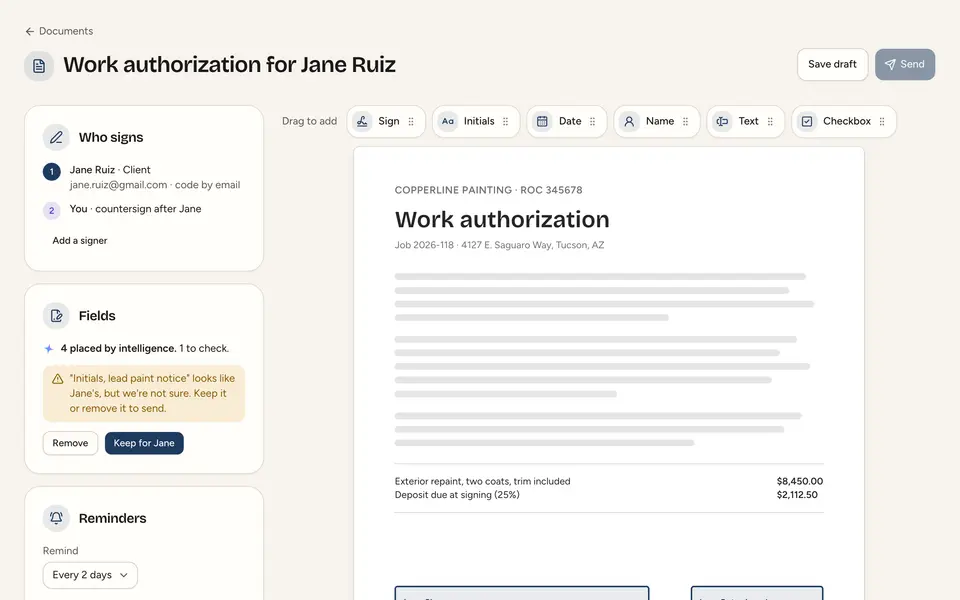
Upload a PDF, or start from a template.
Intelligence finds where each person signs, initials, and dates. You check every place before anything goes out.
- Templates for the agreements you send every week
- Client details filled in for you
- Low-confidence places flagged, never guessed
- Step 2
They sign on their phone, on your site.
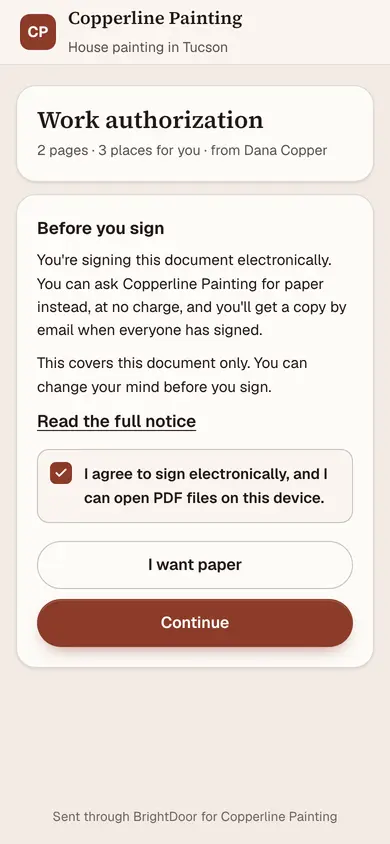
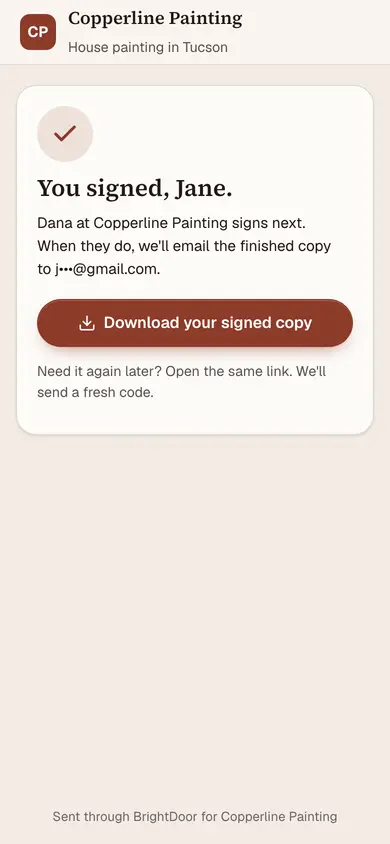
The email comes from your business. The signing page is on your own address, in your colors. A code to their email checks it's them.
- No app to download, no account to make
- One place at a time, zoomed in to fit a thumb
- They can ask for paper instead, any time
- Step 3
Sealed, and saved on the client.
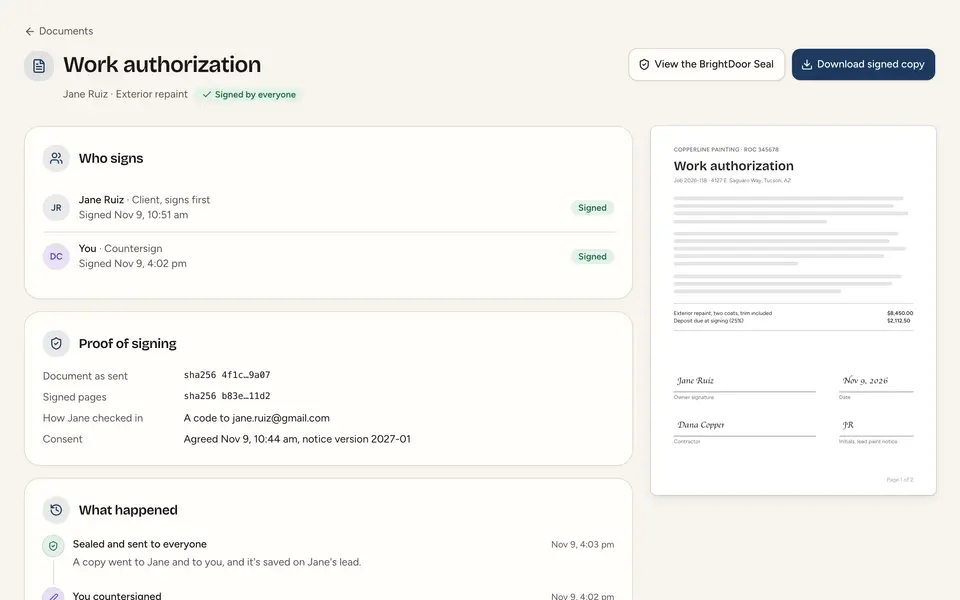
When everyone has signed, BrightDoor seals the file and sends each person a copy. Yours is saved on the lead or client, with every step recorded.
- Signers in the order you choose, with reminders
- Bounced emails caught, and fixed without starting over
- Every step timed and kept


What your client sees
Your name on it. Not ours.
They're signing with you. The page they sign on should say so.
A separate signing tool
- Another company's name on the email
- Signing on another company's website
- One more login, and one more bill
- The signed copy in another inbox, away from the client
Signing in BrightDoor
- Your name and logo on the email
- Signed on your own website address, in your colors
- Nothing new to log in to
- The signed copy saved on the client, beside their messages
The BrightDoor Seal
Proof that holds up, years later.
Every signed copy ends with a certificate of completion and carries BrightDoor's seal. If anyone ever asks whether it was changed, the answer takes seconds.
- A seal Adobe trustsOpen the file in Adobe Acrobat and its signature panel shows it unchanged since it was sealed.
- Anyone can check itDrop the file on brightdoor.ai/verify, or scan the code on its last page. The file is never uploaded.
- Every step on the last pageWho signed, how they checked in, when they agreed, and from what device. In your colors, with our seal.


Who it's for
Whatever you send for a signature.
Any PDF works. These are the ones we hear about most.
Home services
Work authorizations, change orders, waivers, and the quotes you send.
Any small business
Service agreements, releases, consent forms, and whatever you send every week.
Realtors
Buyer and listing agreements, and the addenda you upload.
Loan officers
Authorizations and forms that live outside the loan system.
Brokerages and offices
Every agent sends from their own page. Owners see every document.
Law officesLater in 2027
Engagement letters and fee agreements, private by design.
The price
Included. No envelopes to count.
E-signatures come with every paying BrightDoor plan. There's nothing to add, no seat for signing, and no fee per document.
- Up to 50 documents a person a month, more than almost anyone sends
- A code to each signer's email, at no cost to you or them
- The seal, the certificate, and the record on every copy
- Fields placed by intelligence on every new document
Questions
Straight answers.
Anything else, write to us. A person answers.
When can I use it?
Early 2027. We start with a small group of home-services owners and other small businesses. Ask for early access and we'll write when your spot is ready.
What does it cost?
Nothing extra. It's included in every paying BrightDoor plan, with a fair-use limit of 50 documents a person a month. There are no per-document fees.
Do the people signing need an account?
No. They open the link in your email, agree to sign electronically, enter a code we send to their email, and sign. No app and no account.
Is an electronic signature legal?
Yes, for most agreements. In the US, the ESIGN Act and each state's electronic transactions law make it as binding as ink. In Canada, each province's electronic commerce law does the same. A few documents still need paper, like wills and powers of attorney, and we'll tell you before you send one.
Can I use my own documents?
Yes. Upload any PDF, or save it as a template for the agreements you send every week. Intelligence places the fields; you check each one.
How does someone check a signed document is real?
Two ways. Open it in Adobe Acrobat, where the signature panel shows it unchanged since it was sealed. Or drop it on brightdoor.ai/verify, or scan the code on its last page, to see who sent it, who signed, and when. The file is never uploaded.
Does it work in Canada and in French?
Yes. It opens in the US and Canada together, and the signing pages, emails, and certificate come in English and French.
Where are signed copies kept?
On the lead or client they're about, in your BrightDoor account, for as long as your account is open. You can download any of them whenever you like.
Can I still use Docusign?
Yes. If your brokerage requires another tool, keep using it. BrightDoor is there for everything else you send.
Coming soon · Early 2027
Be one of the first to send.
Tell us what you send for a signature today. We'll write as soon as your spot is ready.